Closed Testing
Google Play Closed Testing Complete Playbook 2026: 12 Testers, 14 Days, and Production Access
The end-to-end 2026 playbook for Google Play closed testing — setup, tester onboarding, the 14-day window, opt-in tracking, production access prep, and common mistakes that delay Android launches.
On this page · 17 sections
- 01Who must run closed testing in 2026
- 02Closed testing vs internal and open testing
- 03The 12 testers and 14 continuous days requirement
- 04Pre-flight checklist before you upload
- 05Setting up the closed test track in Play Console
- 06Recruiting and onboarding real testers
- 07Tester instructions that produce useful feedback
- 08The fourteen-day timeline playbook
- 09Tracking opt-ins and participation daily
- 10Bug triage and release updates during the test
- 11Preparing your production access submission
- 12Common mistakes that extend your timeline
- 13When managed testing beats DIY recruitment
- 14After production access: open testing and launch
- 15Your 2026 closed testing playbook in summary
- 16Frequently asked questions
- 17Official sources
At a glance
In plain English
- This playbook is the full ops manual: setup → 12 opt-ins → 14 continuous days → production-access application.
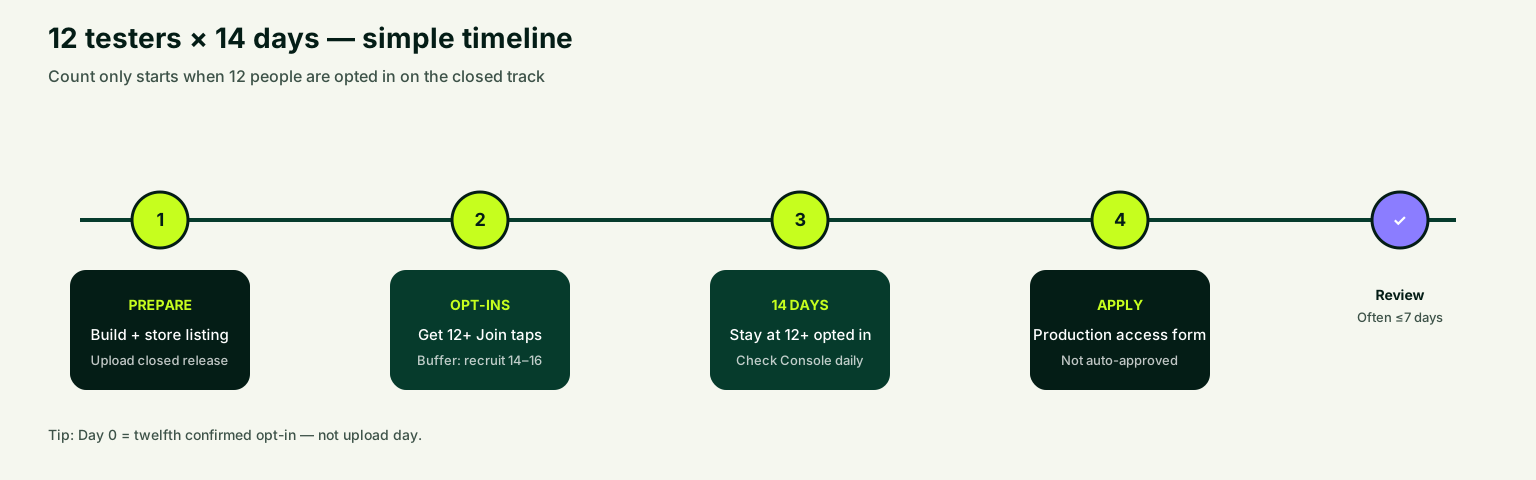
- Day 0 starts when 12 testers are confirmed opted in on the closed track — not when you upload.
- Use chapter CTAs for checklists and managed help only when recruiting is the bottleneck.
This is the complete Google Play closed testing playbook for 2026: how to set up the closed track, get 12 real opt-ins, keep them for 14 continuous days, and apply for production access without reinventing the process each launch.
In plain English: Google often asks new personal developer accounts to prove a private Play Store test before a public listing. The common bar is 12 opted-in testers for 14 days in a row. This document is the long-form ops guide — shorter posts deep-dive individual steps.
Skim the TL;DR, then jump to the chapter you need. If you only need a definition, start with what is closed testing.
Who must run closed testing in 2026
Google's testing requirement applies to newly created personal developer accounts. If your Play Console account was created after the policy took effect and you have not yet received production access, you need a closed test that meets Google's criteria before applying. Organization accounts and accounts that already have production access follow different paths, but every new Android app benefits from structured pre-release testing.
Even when closed testing is not strictly mandatory for your account type, running a controlled closed test before launch remains smart practice. Real devices, real installs, and real feedback catch onboarding crashes, permission flows, and policy gaps that emulators miss. Treat mandatory closed testing as a launch discipline, not a checkbox you rush through the night before applying.
Start by confirming your account status in Play Console under Dashboard or Policy status. If you see prompts about testing requirements or production access eligibility, assume the closed test is part of your critical path. Use the testing timeline estimator to map your earliest realistic production-access date from today, then add one week of buffer for unexpected review delays.
Closed testing vs internal and open testing
Play Console offers three pre-production test tracks, and they are not interchangeable for production access. Internal testing is fastest for your team — up to a hundred testers with near-instant distribution. Closed testing targets a defined group through email lists or opt-in links. Open testing is public-facing and only available after you have production access, which is why new personal accounts must clear closed testing first.
The common failure mode is spending two weeks on internal testing and discovering none of it counted toward production access. Internal testing remains valuable for smoke tests, but the qualifying run must happen on the closed track with proper opt-ins. Read internal testing vs closed testing for a side-by-side comparison before you invite your first tester.
Open testing has its place after launch — broader feedback, soft marketing, regional experiments — but it cannot substitute for the initial closed test that unlocks production. Build your timeline around closed testing first, then layer open testing once you are live. Many successful launches run closed testing for quality, then open testing for scale after approval.
- Internal testing: fastest QA with trusted team members, not counted for production access.
- Closed testing: controlled group, opt-in required, qualifies for the 12-testers-for-14-days rule.
- Open testing: public beta after production access, useful for scale feedback.
The 12 testers and 14 continuous days requirement
Google's rule for affected personal accounts is precise: at least twelve testers must be opted in for at least the last fourteen days continuously before you apply for production access. Opted in means they accepted the test through the official Play Console flow — not just received an email, joined a Telegram group, or downloaded an APK sideload from a shared link outside the store.
Continuous is the word teams underestimate. If a tester opts out and back in, do not assume earlier days still count for that person. If your count drops below twelve at any point during the window, you may need to restart or extend the timeline. Plan a buffer of fourteen to sixteen testers so one dropout does not reset your clock on day twelve.
The requirement is about opted-in status, not daily active usage — but engaged testers produce stronger production-access answers. Google can ask what you learned from testing, what bugs you fixed, and how testers used the app. Silent opt-ins with zero installs create a weak story that invites follow-up questions. See the full breakdown in Google Play 12 testers requirement 2026.
Pre-flight checklist before you upload
A closed test is only as good as the build you ship. Before uploading to the closed track, verify your release candidate passes basic quality gates: clean install on a physical device, login and signup flows, core feature paths, crash-free sessions on at least two Android versions, and correct package name alignment with your Play Console app entry. Test on both Wi-Fi and mobile data if your app syncs online.
Policy readiness matters too. Confirm your privacy policy URL loads, your data safety form reflects actual SDK behavior, content rating questionnaire is complete, and target API level meets Google's current requirements. Uploading a broken build to closed testing wastes tester goodwill and burns calendar days while you fix blockers that should have been caught in internal testing.
Run through the closed testing checklist tool before release day. Capture screenshots of your Play Console setup, draft tester instructions, and prepare a simple feedback form or shared doc. Front-loaded preparation saves days of back-and-forth during the fourteen-day window and keeps testers engaged when you need them most.
- Confirm release candidate installs cleanly on real Android devices.
- Complete privacy policy, data safety, and content rating in Play Console.
- Verify target API level and signing configuration match production intent.
- Draft tester instructions covering install steps, test flows, and feedback channel.
- Recruit fourteen to sixteen testers before publishing the closed release.
- Set a day-zero date only after the release is approved and available.
Setting up the closed test track in Play Console
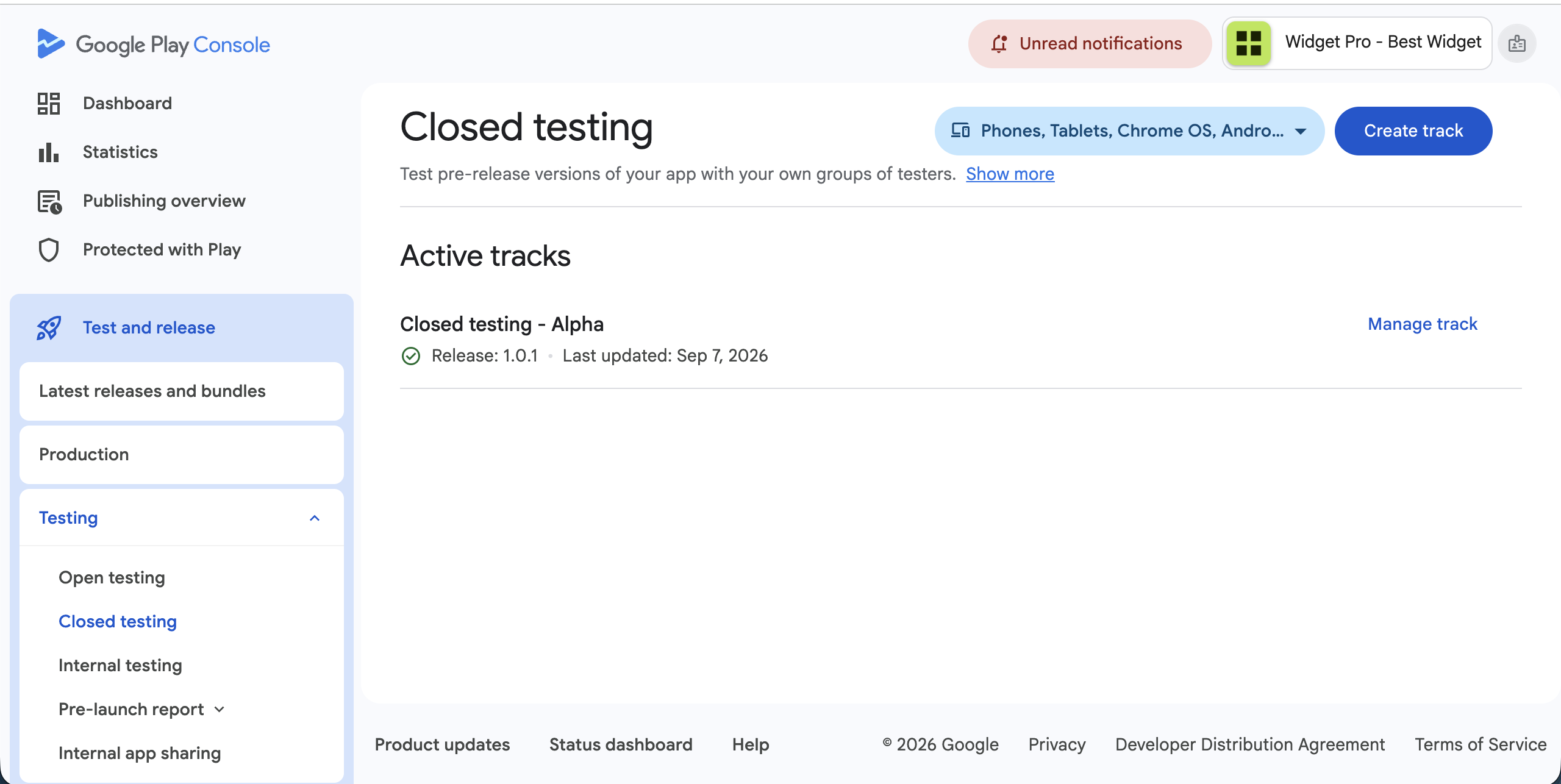
In Play Console, navigate to Testing, then Closed testing. Create a test track if one does not exist — many teams use a single closed track named something like "Pre-launch beta." Add testers via email list or create an opt-in link you can share. Email lists give you direct control; opt-in links scale better when recruiting from communities, Discord servers, or beta mailing lists.
Upload your Android App Bundle to the closed track, complete release notes testers will see, select countries where the test is available, and roll out the release. Google reviews closed testing releases, so approval time varies — often hours, sometimes longer for first uploads or sensitive app categories. Do not start your fourteen-day clock until the release is actually available to testers and you have verified install on at least one device.
Configure tester groups thoughtfully. A single group with all testers simplifies counting. Multiple groups work if you segment by locale or feature focus, but ensure total opted-in count across groups meets twelve. Match country availability to where your testers live; a US-only release blocks testers in other regions from installing even if they received a valid invitation.
Recruiting and onboarding real testers
Twelve testers sounds small until you need them opted in simultaneously for two weeks. Friends and family can work if they use genuine Google accounts and follow instructions, but social graphs often produce dropouts, wrong accounts, and low engagement. Diverse real-device coverage — Samsung, Pixel, Xiaomi, budget phones, Android 12 through 15 — strengthens both testing quality and production-access credibility.
Write onboarding messages that assume zero Play Console knowledge. Include the opt-in link, step-by-step install instructions, the Google account email they must use, what flows to test, how to report bugs, and a deadline for confirming install. Send a reminder on day two and day five for anyone who has not opted in, and offer a five-minute screen-share for stuck testers.
If recruiting and retention are eating your launch calendar, managed tester services exist for exactly this bottleneck. Get 12 testers for 14 days handles tester sourcing, opt-in tracking, and participation monitoring so you can focus on fixing bugs instead of chasing installs.

Tester instructions that produce useful feedback
Vague instructions produce vague feedback. Instead of "test the app and let me know what you think," assign three to five concrete tasks: create an account, complete onboarding, perform the core action your app promises, trigger a notification if applicable, and attempt account deletion or logout. Structured tasks make silent testers visible — if nobody completed task three, you know where to investigate rather than guessing whether the app works.
Provide a single feedback channel: a Google Form, GitHub issue template, email address, or Discord thread. Ask testers to include device model, Android version, steps to reproduce, and screenshots for UI issues. Respond to reports within twenty-four hours when possible; engaged testers stay opted in longer when they see you act on input and ship fixes.
Include policy-relevant flows if your app handles payments, location, health data, or user-generated content. Testers who exercise sensitive permissions give you evidence for production-access questions about how the app behaves in real conditions. Keep instructions updated if you ship a new build mid-test, and highlight which tasks changed so retesting stays focused.
The fourteen-day timeline playbook
Treat the closed test like a mini launch project with daily checkpoints. Day zero is when your release is live and at least twelve testers have completed opt-in — not when you clicked upload. Days one and two focus entirely on opt-in completion, install failures, and account mismatches. Days three through ten push testers through core flows and collect structured feedback you can cite later.
Days eleven through fourteen shift to regression testing, bug fixes, and production-access preparation. Ship patch releases if you fix critical issues, but document every change so your submission answers stay accurate. Do not request production access on day fourteen morning if you are unsure all twelve testers have been continuously opted in since day zero — waiting one extra day is cheaper than re-running the window.
Map your dates with the testing timeline estimator and add buffer for Play Console review time on both the closed release and the production-access request. Teams that plan backward from their target launch date avoid the panic of discovering they need three extra weeks because they miscounted opt-in continuity or release approval time.
- Day 0: Release approved, twelve-plus testers opted in, instructions sent.
- Days 1–2: Confirm installs, resolve account and country mismatches.
- Days 3–7: Run core flow testing, collect bugs, ship hotfix if needed.
- Days 8–10: Broader device coverage, edge cases, permission flows.
- Days 11–13: Regression pass, finalize production listing assets.
- Day 14+: Verify continuous opt-in window, submit production access request.
Tracking opt-ins and participation daily
Play Console shows tester and opt-in status, but the dashboard alone will not tell you who installed, who opened the app, or who is at risk of opting out. Maintain a simple tracker — spreadsheet or project board — with tester email, opt-in date, install confirmed yes/no, device info, feedback submitted, and last check-in date. Update it daily before you do anything else.
Check opt-in count every morning during the fourteen-day window. If someone opts out, recruit a replacement immediately and note whether your continuous window needs extension. Screenshot your tester dashboard periodically with private data redacted; these records help if Google asks about your testing process during production access review.
Automated monitoring saves hours compared to manual polling. Whether you track manually or through a managed testing workflow, the habit is the same: never assume yesterday's count holds today. One opt-out on day thirteen can invalidate weeks of planning, so treat opt-in stability as a daily KPI alongside crash rate.
Get 12 testers for 14 daysManaged opt-ins and monitoring if recruiting is blocking the calendar.Bug triage and release updates during the test
Closed testing is the right time to fix showstoppers. Prioritize crashes on launch, authentication failures, payment errors, and broken core flows. Cosmetic issues and nice-to-have features can wait for post-launch updates unless they block testers from completing assigned tasks or misrepresent what production users will see.
When you upload a new build to the closed track, Google reviews it again and testers may need to update through the Play Store. Announce updates in your feedback channel with a short changelog. Keep the closed test active throughout — pausing or abandoning the track during the fourteen-day window creates unnecessary risk and can disrupt opt-in continuity.
Document every bug found, every fix shipped, and every tester comment worth mentioning. This log becomes the backbone of your production-access application answers. Reviewers respond better to specific examples — "testers on Android 14 reported a crash on signup, fixed in version 1.0.3" — than generic claims that testing went well without details.
Preparing your production access submission
When the fourteen-day continuous window is complete and twelve testers remain opted in, navigate to Production in Play Console and request access. Google asks about your testing process: how many testers participated, what feedback you received, what issues you found and fixed, and why the app is ready for production. Answer with specifics drawn from your test log, not marketing language.
Before submitting, double-check listing readiness — store description, screenshots, feature graphic, app category, contact email, and policy declarations. Production access and listing review can overlap, but incomplete policy setup causes delays independent of testing quality. Align your store assets with what testers actually experienced in the closed build so reviewers see consistency.
If production access is denied, read the reason carefully, keep your closed test running, fix identified issues, and reapply with an improved testing summary. Denial is frustrating but not always permanent — many apps succeed on the second attempt with stronger evidence and clearer answers. See how TestMyApps works if you want support through resubmission.
Common mistakes that extend your timeline
Starting the fourteen-day clock before the release is approved and available is the most frequent timing error. Uploading alone does not mean testers can install. Wait until Play Console shows the release as available on the closed track and confirm at least one tester completed a successful install before calling it day zero — then confirm all twelve are opted in before counting forward.
Using the wrong test track — internal instead of closed — wastes entire weeks. Inviting testers with non-Google accounts, wrong email addresses, or accounts that differ between opt-in and install creates phantom participants who never count. Replacing testers mid-window without tracking continuous opt-in dates can silently reset your eligibility even when headline count looks fine.
Other delays come from shipping broken builds, ignoring tester feedback until day thirteen, and submitting production access with vague answers. Run the closed testing checklist again before applying. A few hours of verification beats another fourteen-day cycle and keeps your launch credibility intact with Google.
- Counting days from upload instead of release availability and opt-in completion.
- Running internal testing only and skipping the closed track entirely.
- Recruiting exactly twelve testers with no dropout buffer.
- Submitting production access with generic answers and no bug-fix evidence.
- Letting opt-in count drop below twelve during the qualifying window.
When managed testing beats DIY recruitment
Self-managed closed testing works when you have a reliable network of fourteen or more people with Android phones, Google accounts, and patience for two weeks of follow-ups. Solo developers, small teams without Android users in their circle, and founders targeting tight launch dates often hit recruitment walls within days and lose another week restarting.
Managed testing services source real testers, deliver opt-in links, monitor participation, and alert you when counts drop. The cost is typically far lower than three weeks of delayed revenue or repeated fourteen-day cycles. Compare get 12 testers for 14 days against the opportunity cost of a slipped launch date and the engineering time spent chasing opt-ins.
DIY and managed approaches can also combine: use friends for qualitative feedback during internal testing, then run the qualifying closed test with a managed group to guarantee opt-in stability. The goal is production access with a credible testing story, not proving you can do everything alone when your launch window is fixed.
Get 12 testers for 14 daysManaged closed testing from $15 — 14 testers, 16-day window, closeout report.After production access: open testing and launch
Production access unlocks the ability to publish your app to the Google Play Store and optionally run open testing tracks. Many teams ship to production with a staged rollout — five percent, twenty percent, fifty percent, full — to catch last-minute issues while limiting blast radius. Closed testing catches most blockers; staged rollout catches scale effects and device-specific edge cases at volume.
Open testing becomes available for broader beta feedback, community building, and pre-launch buzz. It is not a replacement for the closed test you already completed — it is the next layer. Keep closed testing groups informed when you go live; early testers often become your first advocates, reviewers, and word-of-mouth channel.
Update your store listing, monitor crash rates in Play Console vitals, respond to early reviews, and plan your first post-launch update. The closed testing playbook ends at production access, but launch discipline continues. Teams that treat the first thirty days as extended beta ship faster fixes, reduce churn, and earn better long-term store ratings.
Your 2026 closed testing playbook in summary
Google Play closed testing in 2026 demands precision: the closed track, twelve opted-in testers, fourteen continuous days, real feedback, and a credible production-access application. Miss any element and your launch timeline stretches by weeks. Front-load preparation, track opt-ins daily, and document everything testers find so your submission tells a coherent story.
Use the tools and guides in this cluster — what is closed testing, 12 testers requirement, internal vs closed, the checklist, and the timeline estimator — as your operating system. Add managed closed testing when recruitment or retention is the bottleneck rather than app quality.
The developers who ship fastest treat closed testing as a launch project with owners, deadlines, and daily metrics — not a background task they check once a week. Run the playbook, hit the numbers, and move to production with confidence. Your future self will thank you for the buffer testers, the daily opt-in log, and the bug journal you kept from day one.
FAQ
Questions about this topic
How many testers do I need for Google Play closed testing in 2026?
Google requires at least twelve opted-in testers for affected new personal developer accounts. Recruiting fourteen to sixteen gives you a buffer if someone opts out during the fourteen-day window.
When does the fourteen-day closed testing window start?
The safest approach is to start counting when your closed testing release is approved and available in Play Console and at least twelve testers have completed opt-in — not when you first upload the build.
Can I use internal testing instead of closed testing for production access?
No. Internal testing is useful for early QA, but production access for affected personal accounts requires a qualifying closed test with the correct opt-in flow on the closed track.
Do testers need to use the app every day during closed testing?
Google's stated requirement is continuous opt-in for fourteen days, not daily usage. However, engaged testers who exercise core flows give you stronger production-access answers and better bug coverage.
What happens if a tester opts out during the fourteen-day window?
If your opted-in count drops below twelve, you may need to recruit replacements and extend the timeline. Replace dropouts immediately and verify the continuous window before applying for production access.
Can I request production access on day fourteen?
You can apply once twelve testers have been continuously opted in for fourteen days and your app meets policy requirements. If timing is uncertain, wait an extra day or two rather than submitting with a weak window.
Sources
Official references used
- App testing requirements for new personal developer accounts (Google Play Console Help)
- Set up an open, closed, or internal test (Google Play Console Help)
- Release app updates with staged rollouts (Google Play Console Help)
- Prepare and roll out a release (Google Play Console Help)
Continue
Choose the next step
Related
Next pages to read
Need 12 testers for 14 days?
Start a managed Google Play closed-testing run with verified testers, opt-in monitoring, and a closeout report.