Closed Testing
What Is Google Play Closed Testing? Requirements and Setup
Learn how Google Play closed testing works, who needs 12 testers for 14 days, how opt-ins count, and how to set up the correct Play Console track.
On this page · 8 sections
At a glance
In plain English
- Closed testing = share your Android app with a private group through the Play Store before launch.
- New personal Play accounts usually need 12 testers opted in for 14 continuous days before they can apply for production.
- Internal testing is faster for your team — but it does not count for that rule.
In plain English: closed testing lets a small group install your app from Google Play before everyone else can. You choose who joins. They use a real Play Store link on real phones.
If you opened a new personal developer account, Google often requires this step before you can apply for production (the public listing). The common rule is: at least 12 testers must stay opted in for 14 days in a row on the closed track.
This guide explains what closed testing is, who needs it, and how to set it up — without Play Console jargon first. When you want every detail, open the complete closed testing playbook.
Open the closed-testing checklistA simple list to check before you start the 14-day clock.How closed testing works in Play Console
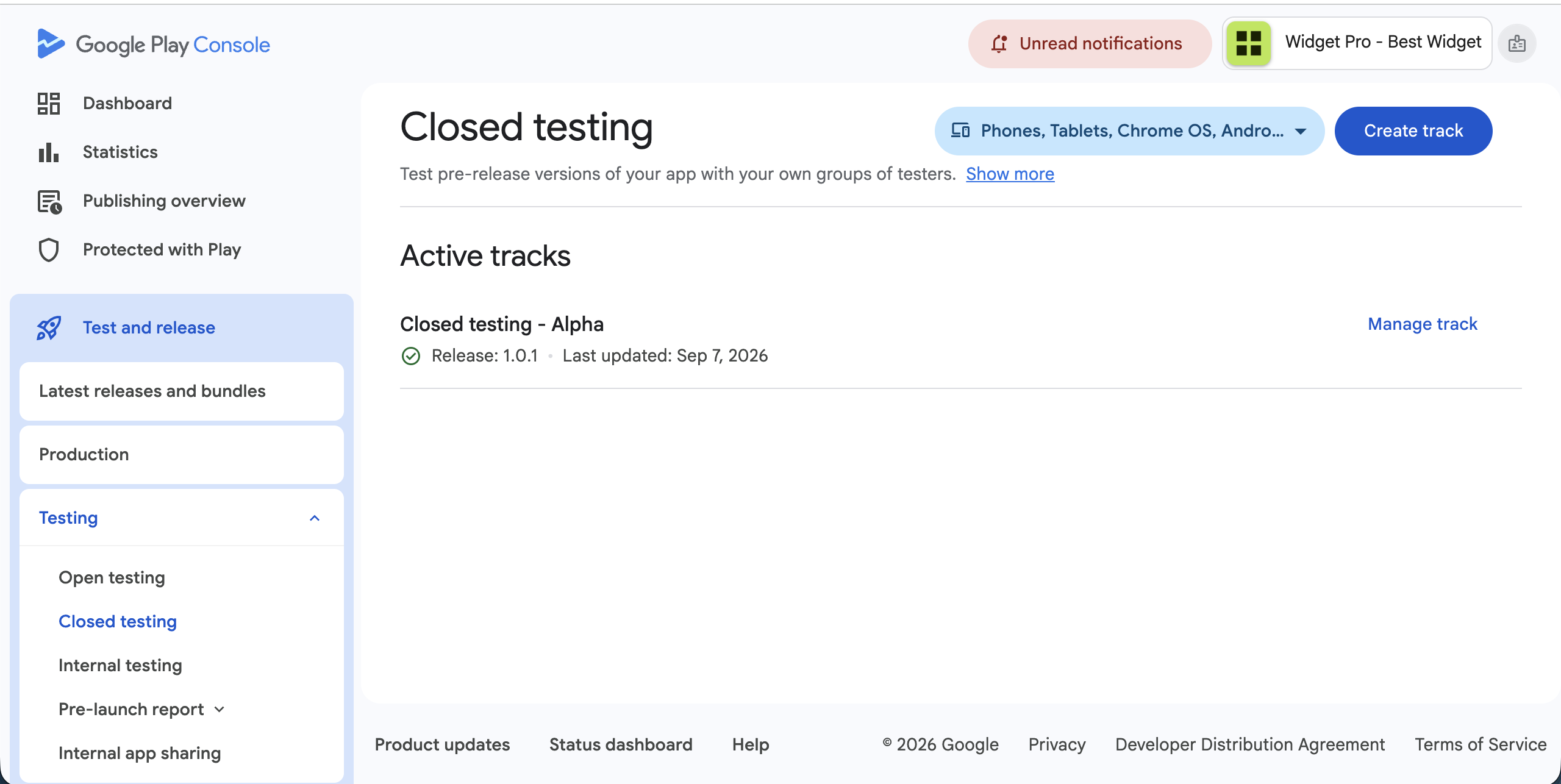
Closed testing lives under Release → Testing next to internal and open testing. You upload an Android App Bundle, create a release on the closed track, invite testers (email list or opt-in link), and roll out. Google reviews the test release before people can install — plan a short wait after upload.
Testers need a Google account. They open the invite, join on the Play test page, then install from that same path. That official path is why closed testing can count toward production access while emailed APKs do not.
Who needs closed testing in 2026
Google's testing requirement applies to newly created personal developer accounts that have not yet received production access. Organization accounts and accounts that already publish may follow different rules — check your Play Console dashboard prompts.
Even when it is not mandatory, closed testing is still a smart rehearsal: real devices, real permission prompts, real networks.
Closed vs internal vs open testing
Internal testing is fastest for your team (up to 100 trusted testers) but does not satisfy the 12×14 production-access rule for affected personal accounts.
Closed testing is the controlled external group with opt-in — that is the track tied to 12 testers for 14 continuous days.
Open testing is public-facing and only available after you have production access.
- Internal: quick smoke tests with your team — does not count for production access.
- Closed: invite/opt-in group — qualifies for the 12×14 rule when Google requires it.
- Open: public beta after production access.
Step-by-step: set up your first closed test
Use a release-candidate build. Finish store listing draft, privacy policy URL, Data safety, and content rating so review is not blocked.
Create the closed track, add emails or an opt-in link, upload the AAB, write clear release notes, start rollout. While Google reviews, send a one-page brief: how to join, what to try, how to report bugs.
Recruit 14–16 people so one dropout does not drop you under 12. Track opt-ins in Console daily — an email sent is not an opt-in.
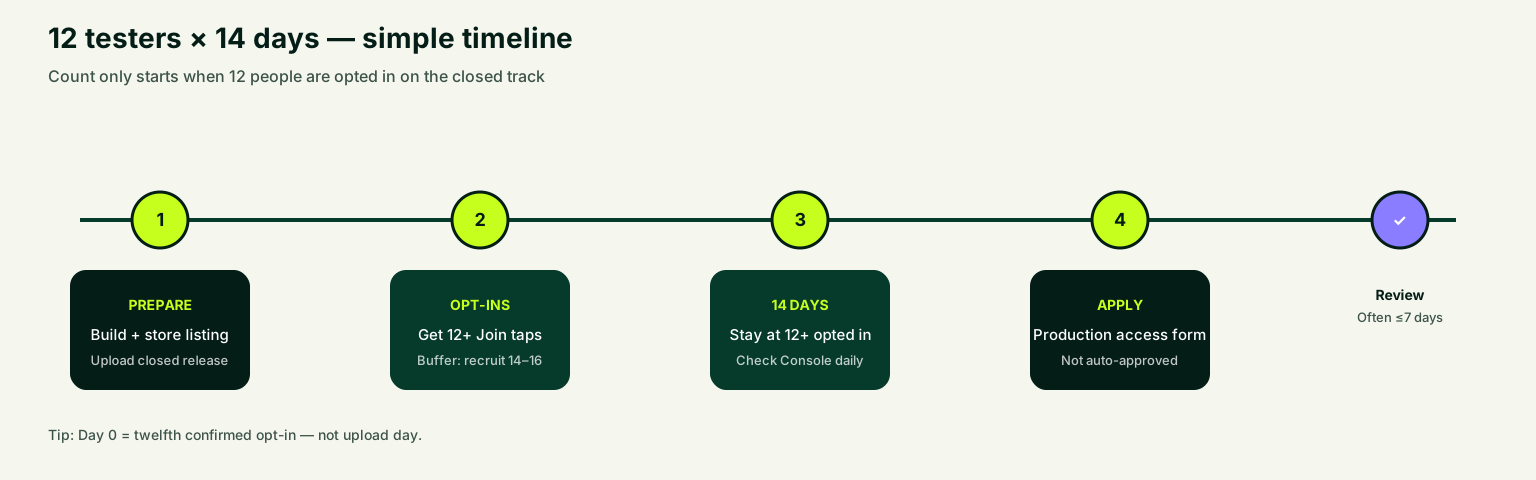
- Prepare AAB, listing, privacy policy, and Data safety.
- Create closed track and tester emails or opt-in link.
- Upload release and start rollout.
- Send invites with a short testing brief.
- Confirm 12+ opted in before you treat day 0 as started.
What testers should do
Give concrete tasks: create an account, finish onboarding, use the main feature, change a setting, try a bad network or denied permission.
Collect feedback in a simple sheet (device, Android version, steps, screenshot, severity). Specific fixes make stronger production-access answers later.
How this connects to production access
After at least 12 testers stay continuously opted in for 14 days, you can apply for production access. Approval is a separate review of the app and your answers — the clock alone does not auto-approve.
Keep the closed test healthy while you wait. Silent installs and unfixed crashes often lead to "try again" or denial.
FAQ
Questions about this topic
What is Google Play closed testing used for?
Google Play closed testing lets you distribute a pre-release Android build to a controlled group of testers through the official Play Store opt-in flow. For affected new personal developer accounts, it is also the required step before requesting production access — at least twelve testers must remain opted in for fourteen continuous days on the closed track.
Can internal testing replace closed testing?
No. Internal testing is useful for early QA with up to one hundred trusted testers, but it does not satisfy the production-access requirement for affected personal accounts. You need a qualifying closed test with proper opt-ins on the closed track.
Do testers need Google accounts for closed testing?
Yes. Google requires testers to have a Google Account or Google Workspace account to join Play Console tests. They must use the same account for the invitation, opt-in, and Play Store install.
How long does Google Play closed testing take?
Plan for release review (often one to three days), fourteen continuous days with twelve or more opted-in testers, and up to seven days for production-access review after you apply. Setup and tester recruitment add additional time before the clock starts.
Can I run closed testing and internal testing at the same time?
Yes. Many teams smoke-test on internal testing first, then move a stable build to closed testing for the production-access window. Run internal checks before inviting external testers so you do not waste the fourteen-day window on avoidable crashes.
Is closed testing the same as an open beta?
No. Closed testing is invite-only or link-based with a controlled group. Open testing is public-facing and only available after you have production access. New personal accounts must complete closed testing before they can use open testing.
Sources
Official references used
- App testing requirements for new personal developer accounts (Google Play Console Help)
- Set up an open, closed, or internal test (Google Play Console Help)
Continue
Choose the next step
Related
Next pages to read
Need 12 testers for 14 days?
Start a managed Google Play closed-testing run with verified testers, opt-in monitoring, and a closeout report.